Virtualization on Linux: Understanding Hypervisors, Xen, Virtual Machines, and Containers
By Bruno Hoinacki
Virtualization is a pillar of modern computing and the foundation for cloud computing, DevOps, and high availability. With it, a single physical server runs multiple isolated environments, increasing hardware utilization and scalability.
When you start out, the classic questions come up:
- What is a hypervisor (and what types are there)?
- Where does Xen fit into all this?
- VMs vs. Containers: what is the difference, and when should you choose each one?
This guide combines concepts + hands-on practice so you can make technical decisions with confidence.
🚀 What Is Virtualization?
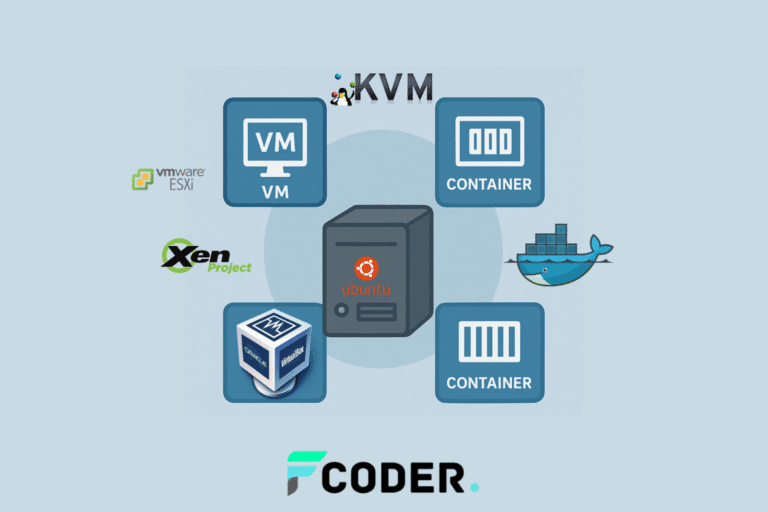
Virtualization is the process of creating a virtual version of a physical resource, whether a server, operating system, network, or storage.
In the server world, it lets you split a single piece of hardware into multiple isolated environments. This means the same physical server can run several different operating systems, each behaving like an independent machine.
Key benefits of virtualization:
Efficiency: better use of available hardware. Imagine a server with 64GB of RAM running a single application that uses 8GB — the other 56GB would sit idle. With virtualization, you put those resources to work by creating multiple environments.
Isolation: problems in one VM do not affect the others. If an application crashes or comes under attack, the rest stay safe and operational.
Scalability: easy creation and destruction of environments as demand changes. Need 10 servers for a test? Spin them up in minutes. Done? Tear them down instantly.
Flexibility: run different systems on the same server. Windows, Linux, BSD — all coexisting on the same physical hardware.
Savings: drastic reduction in costs for hardware, electricity, cooling, and physical space in data centers.
🧩 Hypervisors: The Foundation of Virtualization
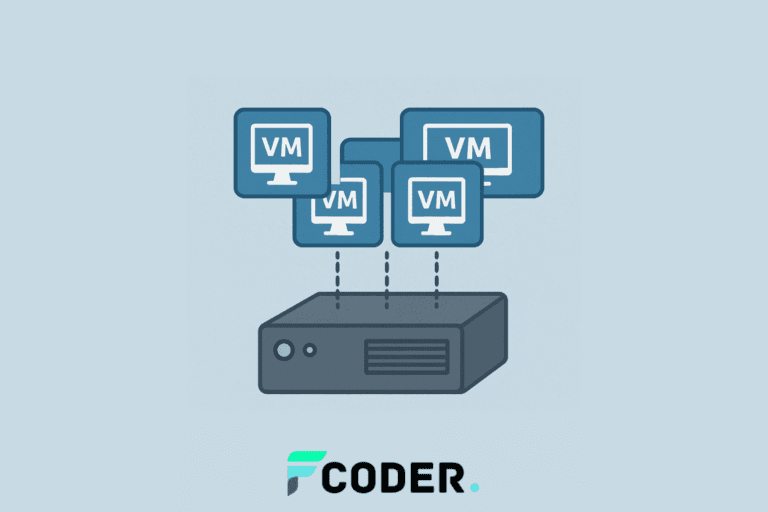
A hypervisor is the layer that mediates access to the hardware and orchestrates the distribution of resources (CPU, memory, disk, network, and devices) among virtual machines (VMs).
Think of it as a conductor: it schedules how many “instruments” (vCPUs, RAM, NICs, disks) each VM can use, prevents resource fights, and ensures isolation, performance, and predictability.
🔹 Type 1 Hypervisor (Bare-metal)
Runs directly on the hardware, with no intermediate OS. It is the default choice for production, cloud, and clusters.
Examples: Xen, KVM (built into the Linux kernel), VMware ESXi, Microsoft Hyper-V.
Strengths:
- Superior performance and latency (fewer layers).
- Robust isolation (great for multi-tenant).
- Enterprise features: live migration, HA, DRS, vMotion/Storage vMotion (ESXi), Cluster Shared Volumes (Hyper-V), etc.
Where it shines: data centers, public/private clouds, mission-critical databases, VDI, VNFs/Telco.
Quick notes by technology
KVM: the de facto standard on Linux; managed through libvirt/virsh/virt-manager.
Xen: Dom0/DomU architecture; widely used in public cloud.
ESXi: part of the VMware vSphere ecosystem (vCenter, vSAN).
Hyper-V: integrated into Windows Server/Azure; managed via Windows Admin Center/SCVMM.
🔹 Type 2 Hypervisor (Hosted)
Runs on top of an existing operating system (the host). Focused on dev/lab use.
Examples: VirtualBox, VMware Workstation, Parallels Desktop (macOS).
Strengths:
- Simple, quick installation.
- Low entry cost (ideal for study, POCs, and demos).
Where it shines: developer laptops, teaching labs, functional/UI testing scenarios.
⚖️ Type 1 vs. Type 2 Comparison Table
| Criterion | Type 1 (Bare-metal) | Type 2 (Hosted) |
|---|---|---|
| Architecture | Hypervisor runs directly on the hardware | Hypervisor runs on top of an OS |
| Performance/latency | 🔥 High (SLAT, less overhead) | Medium (extra OS layer) |
| Isolation/security | Strong (good attack surface) | Depends heavily on the host OS |
| Live migration/HA | Yes, native in most | Limited/absent |
| Drivers/IO | Paravirt (virtio), SR-IOV, pass-through | Usually emulated/paravirt |
| Management | vCenter, SCVMM, libvirt, XAPI | The app's local GUI (Workstation/VirtualBox) |
| Typical use | Production, cloud, clusters | Local dev, lab |
| Complexity | Higher (network/storage/HA) | Low (install and use) |
| Cost | May require licenses and dedicated hardware | Low/zero (desktop-focused) |
| Ideal cases | DBs, VDI, critical apps, multi-tenant | POCs, testing, simulations |
🔐 Hypervisor Security (What Really Matters)
- VM escape: reduce risk by keeping hypervisor patches and host patches always up to date.
- Secure Boot/TPM (vTPM), Measured Boot, and SEV-ES/SEV-SNP (AMD), Intel TDX: protections for confidential VMs.
- Host-level isolation: workloads with different trust levels on separate hosts/clusters.
- Less is more: minimize emulated drivers; prefer paravirt (virtio).
- RBAC & auditing on management platforms (vCenter, SCVMM, OpenStack/Libvirt).
Tip: for sensitive data in containers, consider Kata Containers/gVisor or running containers inside VMs (a common combination in clouds).
🧩 Xen Open-source Paravirtualization
Pros
- Strong isolation (dom0/domU model).
- Efficient paravirtualization in Linux scenarios.
- Mature live migration features.
- Solid foundation for cloud and clusters.
Cons
- Steeper learning curve.
- Smaller ecosystem and tooling than KVM.
- Paravirt drivers may require extra tweaking.
- Management can get complex at scale.
🐧 KVM Linux Kernel Virtio
Pros
- Native to Linux (kernel module).
- Broad tooling support (libvirt, Proxmox, oVirt).
- Great performance with virtio (network/storage).
- Large community and documentation.
Cons
- Requires tuning for I/O-intensive workloads.
- Management can fragment across multiple UIs/CLIs.
- Additional drivers for Windows (virtio).
- Advanced features depend on the chosen stack.
🧱 VMware ESXi Enterprise vCenter
Pros
- Stable, established platform.
- Advanced features (vMotion, HA, DRS).
- Centralized management via vCenter.
- Broad ecosystem of plugins and support.
Cons
- High costs and licensing.
- Dependence on the VMware ecosystem.
- Hardware compatibility requirements (HCL).
- Less flexibility for deep customization.
🪟 Hyper-V Windows Server Azure-ready
Pros
- Native integration with Windows and AD.
- Features like Live Migration and Replica.
- Good cost-benefit option for the Microsoft stack.
- Integrations with Azure/backup/monitoring.
Cons
- Lower compatibility with advanced *nix.
- Features depend on the edition (e.g., Datacenter).
- Tooling geared more toward the MS ecosystem.
- Desktop performance varies by scenario.
🔍 Important Note (Terminology)
Hypervisor is the concept. Hyper-V is a hypervisor (from Microsoft), just like Xen, KVM, and ESXi. Do not confuse the generic term with a specific implementation.
🛠️ Checking for Virtualization Support on Linux
# CPU tem VT-x (Intel) ou AMD-V?
egrep -c '(vmx|svm)' /proc/cpuinfo

# Módulos KVM carregados?
lsmod | grep kvm
Interpretation
0: CPU supports virtualization (vmx = Intel VT-x, svm = AMD-V).
kvm_intelorkvm_amdlisted → KVM ready to use.
🏗️ Xen: A High-Performance Hypervisor (Widely Used in the Cloud)
Xen is an open source Type 1 hypervisor, created in 2003 (University of Cambridge) and maintained by the Xen Project. It is adopted by major providers (e.g., AWS/EC2, Citrix, Oracle Cloud) for its combination of strong isolation + performance.
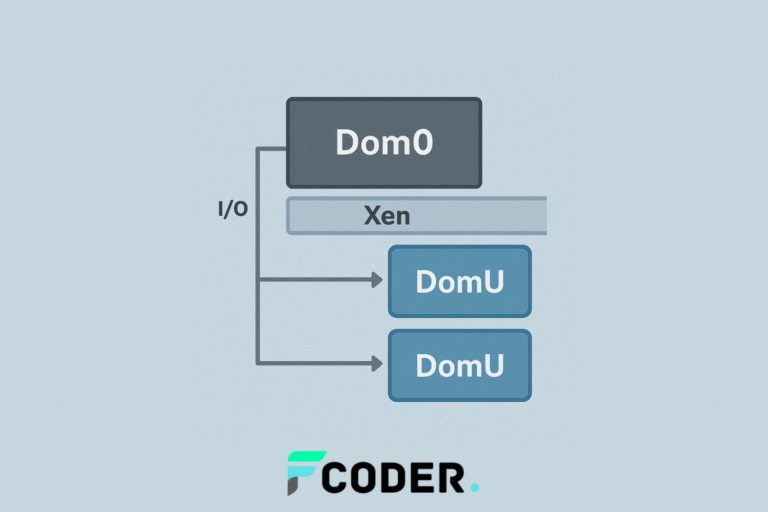
How Xen Organizes the Environment
- Dom0 (Domain 0): privileged VM that manages the hardware and controls the DomUs.
- DomU (User Domain): “regular” VMs that run your applications, isolated from one another.
Virtualization Modes in Xen
- PV (Paravirtualization): “cooperative” guest kernel, less overhead, great for Linux.
- HVM (Full Virtualization): the guest does not need to know it is virtualized; uses VT-x/AMD-V; compatible with Windows, BSD, etc.
Installation (Ubuntu/Debian example)
sudo apt update
sudo apt install xen-hypervisor-amd64 xen-tools xen-utils-common bridge-utils
Booting into Xen (GRUB):
sudo nano /etc/default/grub
# selecione a entrada Xen como padrão, ou ajuste conforme a distro
sudo update-grub
sudo reboot
First VM (config example):
# /etc/xen/ubuntu-vm.cfg
name   = "ubuntu-vm"
memory = 2048
vcpus  = 2
disk   = ['file:/var/lib/xen/images/ubuntu-vm.img,xvda,w']
vif    = ['bridge=xenbr0']
boot   = "c"
Useful commands (xl):
sudo xl create /etc/xen/ubuntu-vm.cfg
sudo xl list
sudo xl console ubuntu-vm
sudo xl pause|unpause ubuntu-vm
sudo xl shutdown|destroy ubuntu-vm
Why teams choose Xen
- 🔐 Strong isolation (multi-tenant).
- ⚡ Near bare-metal performance.
- 🔁 Live migration.
- 🌐 Broad compatibility (Linux/Windows/BSD).
- 🧩 Open source with no lock-in.
🖥️ Virtual Machines (VMs): The “Complete Computer” Inside the Host
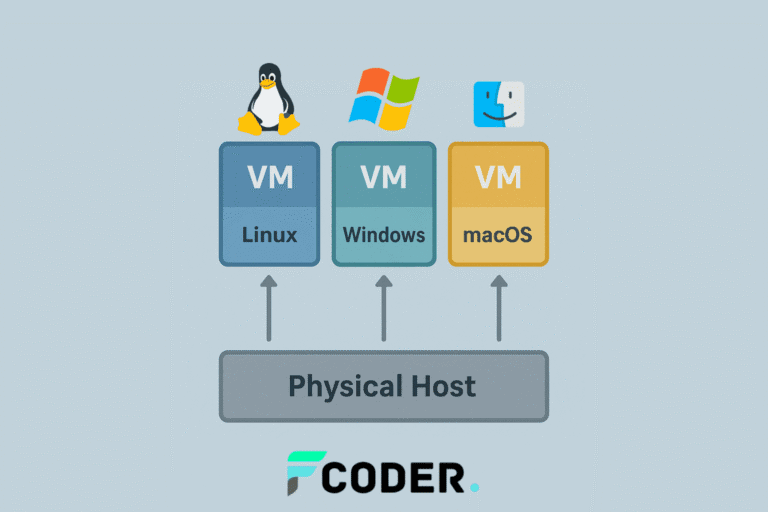
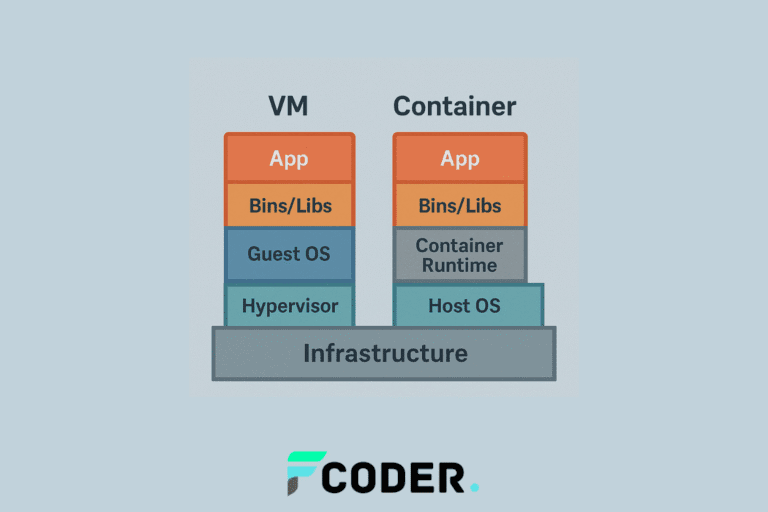
A VM has its own kernel, OS, libraries, and apps, like a complete PC running inside another. Excellent for isolating workloads, running different systems, and supporting legacy applications.
Typical VM Stack
- Hypervisor (Xen/KVM/ESXi/Hyper-V)
- Guest (Windows, Linux, BSD)
- Host (physical server)
KVM/QEMU in Practice (Linux)
# Instalar KVM + ferramentas
sudo apt install qemu-kvm libvirt-daemon-system libvirt-clients virt-manager bridge-utils

# Permissões
sudo usermod -aG libvirt $USER
sudo usermod -aG kvm $USER

# Libvirt ativo?
sudo systemctl enable --now libvirtd
sudo systemctl status libvirtd
Creating the VM via CLI
wget https://releases.ubuntu.com/22.04/ubuntu-22.04-live-server-amd64.iso

virt-install \
  --name ubuntu-server \
  --memory 4096 \
  --vcpus 2 \
  --disk size=20 \
  --cdrom ubuntu-22.04-live-server-amd64.iso \
  --os-variant ubuntu22.04 \
  --network bridge=virbr0 \
  --graphics vnc,listen=0.0.0.0
Managing with virsh
virsh list --all
virsh start ubuntu-server
virsh console ubuntu-server
virsh shutdown ubuntu-server
virsh destroy ubuntu-server
virsh snapshot-create-as ubuntu-server snap1
virsh snapshot-revert ubuntu-server snap1
virsh undefine ubuntu-server --remove-all-storage
Advantages
- Run different OSes on the same host.
- Kernel isolation (security).
- Live migration and full snapshots.
- Excellent for legacy apps and custom kernels.
Challenges
- Higher overhead (each VM carries a full OS).
- Slower boot and provisioning than containers.
- Lower density per host.
🐳 Containers: Lightweight Virtualization for Speed and Density
Containers share the host's kernel, isolating processes, network, and filesystem via namespaces and cgroups. The result: startup in seconds, high packing density, and portability.
Under the Hood
- Namespaces: isolate PIDs, UTS, mounts, network, and users.
- cgroups: limit CPU, RAM, and I/O.
- Union FS: reusable image layers.
Docker in Practice
# Instalação rápida
curl -fsSL https://get.docker.com | sh
sudo usermod -aG docker $USER  # re-logar

# Testes
docker --version
docker run hello-world

# Ubuntu interativo
docker run -it ubuntu bash

# Nginx em background
docker run -d -p 8080:80 --name web nginx
docker logs -f web
docker exec -it web bash
docker stop web && docker rm web
Custom image (Python)
# Dockerfile
FROM python:3.11-slim
WORKDIR /app
COPY requirements.txt .
RUN pip install --no-cache-dir -r requirements.txt
COPY . .
CMD ["python", "app.py"]
To start the container
docker build -t minha-app:1.0 .
docker run -d -p 5000:5000 minha-app:1.0
Strengths
- Extremely lightweight and fast.
- Scale CI/CD and microservices.
- Portability (“runs the same anywhere”).
- Very high density per host.
Things to watch
- Less isolation than a VM (shared kernel).
- No distinct OSes (all Linux containers).
- Security depends on good practices (rootless, AppArmor/SELinux).
- Orchestration requires a learning curve (Kubernetes).
⚖️ VM vs. Container: When to Use Each
| Scenario | Best choice | Reason |
|---|---|---|
| Running Windows and Linux on the same host | VM | Isolated kernel per VM |
| Legacy app or specific kernel/modules | VM | Fine-grained kernel control |
| Microservices / CI/CD | Container | Speed and density |
| Fast cloud deployments | Container | Startup in seconds |
| High-security multi-tenant | VM (Xen/KVM/ESXi/Hyper-V) | Kernel isolation |
| Agile local dev | Container | Instant environments |
| Testing different OSes | VM | Emulates full hardware |
| Databases | It depends | VM (isolation) or container with volumes and hardening |
Rule of thumb
- Use VMs for maximum isolation and different OSes.
- Use containers for agility, density, and cloud-native workloads.
- Combine: VMs as the base + containers inside (the standard in public clouds).
🆚 Hyper-V vs. Xen vs. KVM
| Criterion | Hyper-V | Xen | KVM |
|---|---|---|---|
| Type | 1 (bare-metal) | 1 (bare-metal) | 1 (in the Linux kernel) |
| Ecosystem | Windows/Azure | Public clouds, Citrix | Linux (standard in distros) |
| Management | Windows Admin Center, SCVMM | xl, XAPI, Citrix | libvirt/virt-manager/virsh |
| Compatibility | Windows/ Linux | Windows/ Linux/ BSD | Windows/ Linux/ BSD |
| Classic use case | Windows datacenter | Multi-tenant cloud | Linux hosts and clouds |
Hyper-V Xen KVM
Hyper-V — Practical Summary
- Type: 1 (bare-metal)
- Ecosystem: Windows / Azure
- Management: Windows Admin Center, SCVMM
- Compatibility: Windows / Linux
- Classic use case: Windows datacenter
Xen — Practical Summary
- Type: 1 (bare-metal)
- Ecosystem: Public clouds, Citrix
- Management: xl, XAPI, Citrix
- Compatibility: Windows / Linux / BSD
- Classic use case: Multi-tenant cloud
KVM — Practical Summary
- Type: 1 (in the Linux kernel)
- Ecosystem: Linux (standard in distros)
- Management: libvirt, virt-manager, virsh
- Compatibility: Windows / Linux / BSD
- Classic use case: Linux hosts and clouds
💡 Tips and Best Practices
- Hybrid architecture: VMs for security boundaries + containers for speed.
- Orchestration: Kubernetes (production), Swarm/Nomad (smaller scenarios).
- Monitoring:
docker stats, cAdvisor, Prometheus + Grafana. - Security: “slim” images, scanning (Trivy/Clair), rootless, AppArmor/SELinux, gVisor/Kata when needed.
- IaC: Terraform (provision VMs), Ansible (configure), Compose/K8s YAML (apps).
- Persistence: Docker volumes and VM snapshots.
- Optimized images (multi-stage builds, Alpine when it makes sense).
📚 Trusted References
🎯 Next Steps
Hypervisors, Xen, VMs, and Containers are complementary pieces.
- Hypervisors → the foundation (resource control and isolation).
- VMs → the best fit for different OSes and maximum security.
- Containers → the path to agility, density, and scale.
Do it now
- Create a VM (KVM/VirtualBox) and a container (Docker) on your laptop.
- Compare boot time, resource usage, and ease of deployment.
- Level up to Kubernetes and Terraform in a small lab.
🚀 Need to Speed Up Your Project?
Forcoder implements hybrid architectures, migrates containers, configures Kubernetes, and automates CI/CD end to end.
Talk to us and turn your idea into results in production.
💡 Our team can help with planning, auditing, and secure project deployment.